MileGuard
MileGuard Track your lease miles
GET
Available on iPhone · Built for leases

Never pay a lease overage fee again.

Your drives log themselves, and MileGuard shows exactly how much headroom you have left, so you turn the car in clean, with no surprise bill.
No dongle. No hardware. Your iPhone does the tracking.
Currently available on the US App Store. More markets are coming.
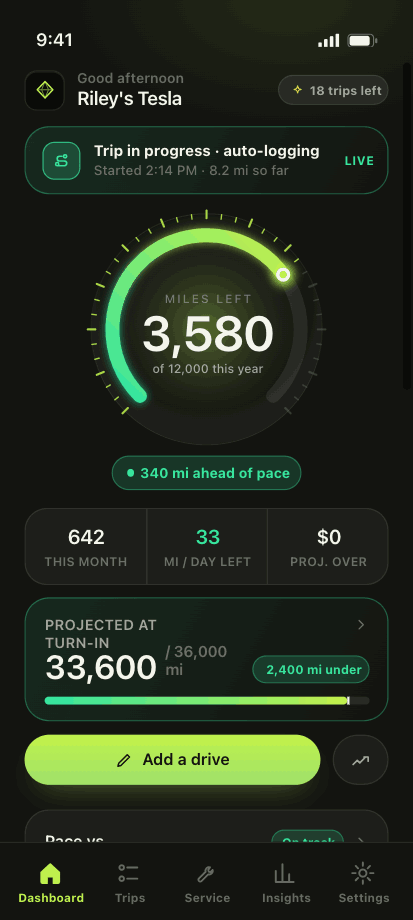
Miles left
3,580
On pace to turn in
2,400 mi under
MileGuard dashboard showing 3,580 lease miles left with a live gauge

Most leases charge $0.15–$0.30 for every mile over. Go 2,000 miles past your limit at $0.25 and that's a $500 surprise at turn-in. MileGuard makes sure you see it coming.

Automatic tracking

Your drives log themselves.

Powered by your iPhone's motion sensing and GPS. No dongle to buy, nothing to pair, nothing to plug in. Motion sensing notices you've started driving; GPS measures the distance. Forget a trip? Add it in two taps.
Runs quietly in the background as you drive
No hardware, no subscriptions to third-party gadgets
Follows this iPhone, not your VIN
Prefer manual? Enter an exact odometer reading anytime
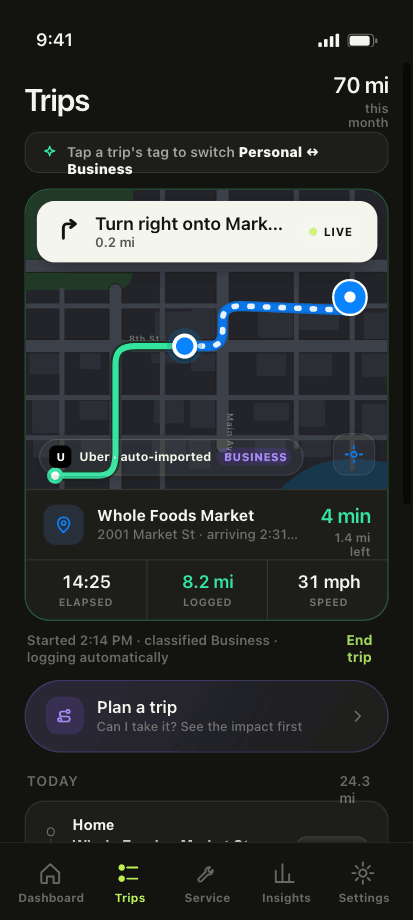
MileGuard automatically logging a live drive on the map
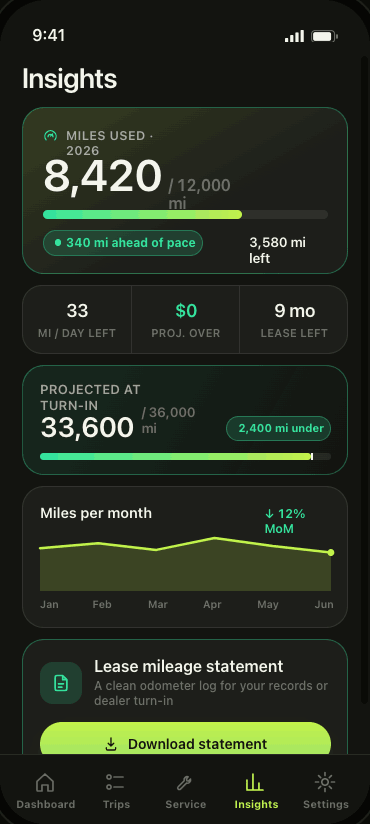
MileGuard projecting turn-in mileage with monthly trends
Headroom

Know your turn-in number before turn-in day.

MileGuard projects where you'll land at lease-end based on how you actually drive, not a flat average. Watch your headroom, see your miles-per-day budget, and adjust early, while it still costs you nothing.

Live projection of your mileage at turn-in
Daily budget so you always know your ceiling
A clean mileage statement to download anytime
Trip planner

"Can I make this trip?" Answered.

Punch in a drive before you take it and MileGuard shows exactly what it does to your buffer. Weekend road trip? Know whether it fits, down to the mile, before you pull out of the driveway.
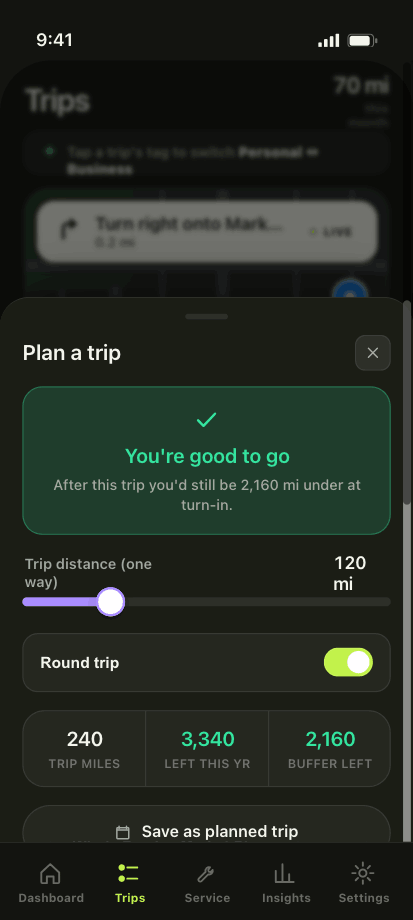
Instant "you're good to go" or "this pushes you over"
Round-trip math done for you
Save planned trips and watch your buffer update
MileGuard trip planner showing you're good to go with 2,160 miles of buffer
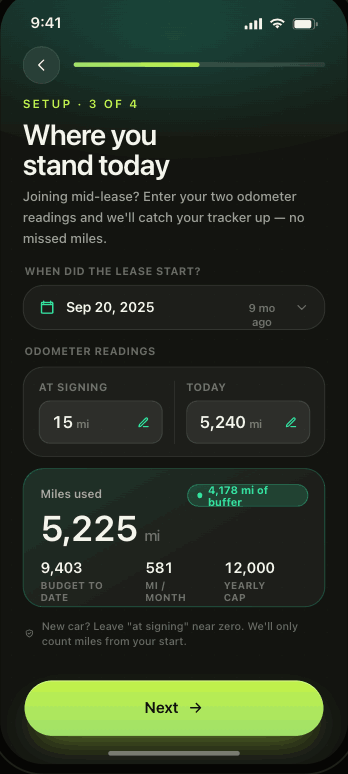
MileGuard mid-lease catch-up: enter your odometer at signing and today
Already mid-lease?

Started late? Catch up in seconds.

Just found MileGuard three months into your lease? Enter two odometer readings (at signing and today) and we backfill your tracker so nothing's missed. You're up to speed instantly, no matter when you start.

Two readings and you're fully set up
Any lease term, any start date
Custom allowances and overage rates supported
Everything in one app

Built to keep you under the limit

Real-time visibility into your lease mileage, plus the tools to act on it.

Smart alerts

Get a nudge as you approach your limit, before you cross it, not after.

Home-screen widgets

Your miles left, right on the Home Screen and Lock Screen. One glance, no app open.

Lease statement

Download a clean odometer log for your records or for dealer turn-in.

Service tracking

Log oil changes, tire rotations and more. Stay on top of maintenance in one place.

Turn-in projection

See your projected end-of-lease mileage update as your driving changes.

Private by design

Your driving data stays on your device. No account, and we never sell it.

Pricing

Pick the plan that fits your lease

One overage fee costs more than a year of MileGuard. The yearly plan starts with a 7-day free trial. Cancel anytime.

Weekly
$6.99 / week
Flexible · billed weekly
Everything in MileGuard
Cancel anytime in Settings
Good for a short lease term
Get MileGuard
Monthly
$9.99 / month
Billed monthly
Everything in MileGuard
Cancel anytime in Settings
Good for a mid-lease catch-up
Get MileGuard
Best value
Yearly
$49.99 / year
Just $4.17/mo · 7-day free trial
Automatic drive tracking
Turn-in projection & trip planner
Widgets, alerts & service tracking
Downloadable lease statement
Start 7-day free trial

The 7-day free trial is offered on the yearly plan only; the weekly and monthly plans begin billing immediately. A free trial converts to a paid subscription unless canceled at least 24 hours before it ends. Payment is charged to your Apple ID; manage or cancel anytime in App Store settings. Prices shown are for the United States and may vary by region.

Questions about plans, trials, or canceling? Visit our billing help center.

FAQ

Frequently asked questions

Everything you need to know before you download.

How does MileGuard track my miles?
MileGuard uses your iPhone's motion sensing to notice when you've started driving, then measures the distance from GPS. No OBD dongle, nothing to pair, nothing to plug in. It follows this iPhone rather than your VIN, so a rental or a drive where you were the passenger won't be logged. You can add or correct any reading manually by entering your exact odometer number.

More on this

Do I need to buy any hardware?
No. Everything runs on the iPhone you already have. There's no dongle to order, no device to charge, and nothing to install in your car.

More on this

I'm already a few months into my lease. Can I still use it?
Absolutely. During setup, just enter two odometer readings (the mileage at signing and your mileage today) and MileGuard backfills your tracker so nothing's missed. You'll be fully caught up in seconds.

More on this

Is my data private?
Yes. Your lease, vehicle, and trip data are stored on your device, and MileGuard has no server that receives your location. We don't sell, rent, or share your personal information with third parties for marketing purposes, and you're always in control of what the app can access.

More on this

How much does it cost?
MileGuard is a subscription: $6.99 a week, $9.99 a month, or $49.99 a year (about $4.17 a month), whichever fits your lease. The yearly plan starts with a 7-day free trial; the weekly and monthly plans do not include one. One avoided overage fee typically pays for years of the app. Subscriptions are billed through your Apple ID and can be canceled anytime.

More on this

Can I track more than one vehicle?
Right now MileGuard tracks one vehicle at a time. Multi-vehicle support is something we're actively exploring for a future update. Stay tuned.

More on this

What does MileGuard need to work?
An iPhone, and permission to see where it goes. MileGuard asks for Location access set to Always, plus Motion & Fitness, so it can log your drives in the background without you opening the app. Device compatibility is always listed on the App Store.

More on this

Is MileGuard available outside the US?
Not yet. MileGuard is currently on the US App Store only. More markets are coming, and the App Store listing is the place to check for your region.

More on this

Turn it in clean.

Download MileGuard, set your lease terms once, and never worry about an overage bill again. The yearly plan starts with 7 days free.